
At some point, we all stare at our email signature and wonder: Am I including too much… or not enough?
Do I add my pronouns? A photo? A tagline? A different closing line? Should it feel formal -or more personal? It’s a small space. But it carries a surprising amount of weight. And right now, many professionals feel caught between two things: Wanting to present themselves clearly and thoughtfully -Not wanting to overdo it, or get it wrong.
So what actually works? Let’s simplify it.
Start With What Matters Most: Clarity
An effective email signature doesn’t try to say everything. It does three things well:
• Identifies who you are • Makes it easy to contact you • Sets a tone
That’s it. Everything else is optional.
Closings: Simple Still Wins
There’s no universal “best” sign-off—but there are reliable ones:
• Best • Thank you • Regards • Looking forward
These work because they’re neutral, professional, and widely understood.
If you want something warmer:
• All the best • Many thanks
The key is consistency. Pick one that feels natural and use it.
Titles: Clear Beats Clever
Your title should help people quickly understand your role.
Instead of:
“Solutions Architect of Strategic Growth”
Consider:
“Senior Project Manager” “Leasing Broker” “HR Business Partner”
Clarity builds confidence. Overly creative titles can do the opposite.
Pronouns: A Personal Choice
Including pronouns can be helpful in many environments, especially in global or diverse teams. But it’s just that -a choice.
Some include them. Some don’t. The most effective approach is simple: Include them if they feel natural to you -Don’t feel pressure if they don’t. Professionalism isn’t determined by this one line.
Photos: Use With Intention
Adding a photo can make communication feel more personal.
It’s often helpful in:
• Client-facing roles • Sales or relationship-driven work • Remote teams
But it’s not required -and in some industries, less is more.
If you include one:
Keep it professional, current, and simple.
The One Thing People Often Forget
Your name. More specifically -how it’s said. Even when a name isn’t extremely difficult, people often hesitate: Am I saying that right? That hesitation can shape the tone of a conversation before it even starts.
A Small Addition That Helps
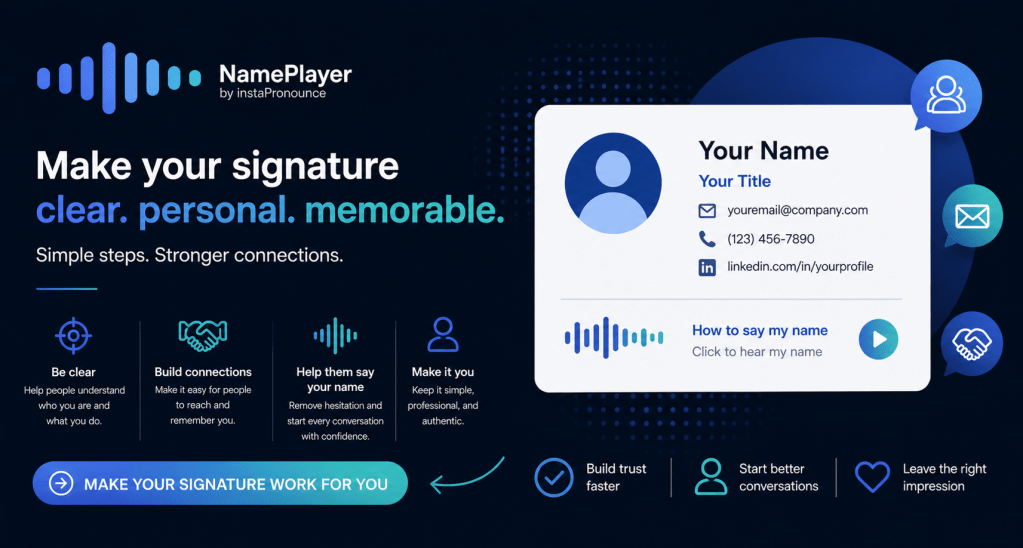
This is where MyNamePlayer fits in. It’s not a requirement. It’s not a statement. It’s not something you need to explain. It’s just a small, optional addition: A simple audio link -your name, in your voice.
Often labeled:
• “How to say my name” • “Click to hear my name” • “Here’s the pronunciation”
It sits quietly in your signature. The people who need it will use it. Others will simply move on.
Why It Works (Even If Your Name Isn’t “Difficult”)
Because it’s not about difficulty. It’s about removing hesitation.
When someone can say your name confidently:
• Introductions feel smoother • Emails feel more personal • Conversations start on a better note
And it all happens without a single extra conversation.
Setup and start using your Free NamePlayer in under 60 seconds! Keep It Simple. Keep It Yours.
In a time when there are more choices than ever, it’s easy to feel like every detail needs to be optimized. It doesn’t.
A strong email signature is:
Clear, Consistent -And comfortable for you
Everything else is optional. Even the most effective additions -like MyNamePlayer work best when they feel natural, not forced.
Final Thought
Your email signature doesn’t need to say everything about you. It just needs to help people connect with you—easily.
Sometimes, that’s as simple as: Letting them hear your name.
#EmailSignature #PersonalBranding #FirstImpressions #CommunicationMatters #ProfessionalPresence #WorkplaceCommunication #DigitalPresence #NamePronunciation #InclusionMatters #HumanConnection #MyNamePlayer #SayMyName


Leave a Reply